Employee AI Assistant
Rebuilding a workplace application to drive engagement
Role
UX Content Strategist
Industry
Fintech
Duration
Oct 2024 - April 2025

A brand new chat with suggestions to help get the conversation rolling
Identify the ask
This is a proprietary generative AI application intended for internal employee work tasks. The business wanted to improve its usability and functionality so employees will adopt the tool and increase work performance.
Objectives
1. Lower the barrier to entry for novice users.
2. Increase ease of use.
3. Provide functionality relevant to the user's work.
4. Allow customization to further efficiency.
Target outcomes
1. Familiarize employees with how to use generative AI technology in their work.
2. Increase employee productivity and job satisfaction by reducing repetitive tasks.
3. Reduce dependency and spending on third-party technology.
A two-phase strategy:
Phase I – align the visual interface with brand standards and apply an engaging, on-brand voice.
Phase II – new functionality suited to users' task flows.
Problem to solve
I wanted to make the AI assistant an engaging and instructive resource that employees would be motivated to use. I wrote content that's instructional and personable.
I advocated for new app functionalities and customizability that suited the workflows of employees.
Who we designed for
Three primary user groups:
1. Novice users – unfamiliar with AI technology and overwhelmed by the interface.
2. Familiar users – some understanding of AI but need support to navigate and maximize the application’s potential.
3. Expert users – well-versed with AI platforms and their value, but limited by the current functionalities unintuitive interface.

The chat feature showing the convo, chat history, and a tool tip.

The prompt feature showing the prompt library
Competitor analysis
I researched third-party AI apps to identify popular functions, features, and interface solutions. The most salient characteristic was a single interface with integrated features.
CX Research
I reviewed preliminary user testing with a pilot group of employees. Data showed which work-tasks employees used the application for, the tasks they wished the application could assist with, and their opinions on the application's usefulness.
Problem statements
1. Not intuitive – users are frustrated by the inefficient interface and need to access key features to accomplish work.
2. Not customizable – users can't manage preferences to fit the needs of their workflow.
3. Unapproachable – users are intimidated and confused by technology without guidance or instruction.
Heuristic evaluation
I reviewed the application using Jakob Nielsen's usability principles to identify strengths and weaknesses of the current design.
Positive findings
1. Dynamic input field allows for efficient collection of user input
2. Customization of the output in the summarization feature.
Areas to improve
1. Contextual help that is easy to understand
2. Consistent and concise labels and buttons
3. Feedback (pop-ups, prompting, previews) for the user's available actions and the outcomes
4. Functionalities like customization (e.g., tone, structure), version comparison, and data retention and sharing
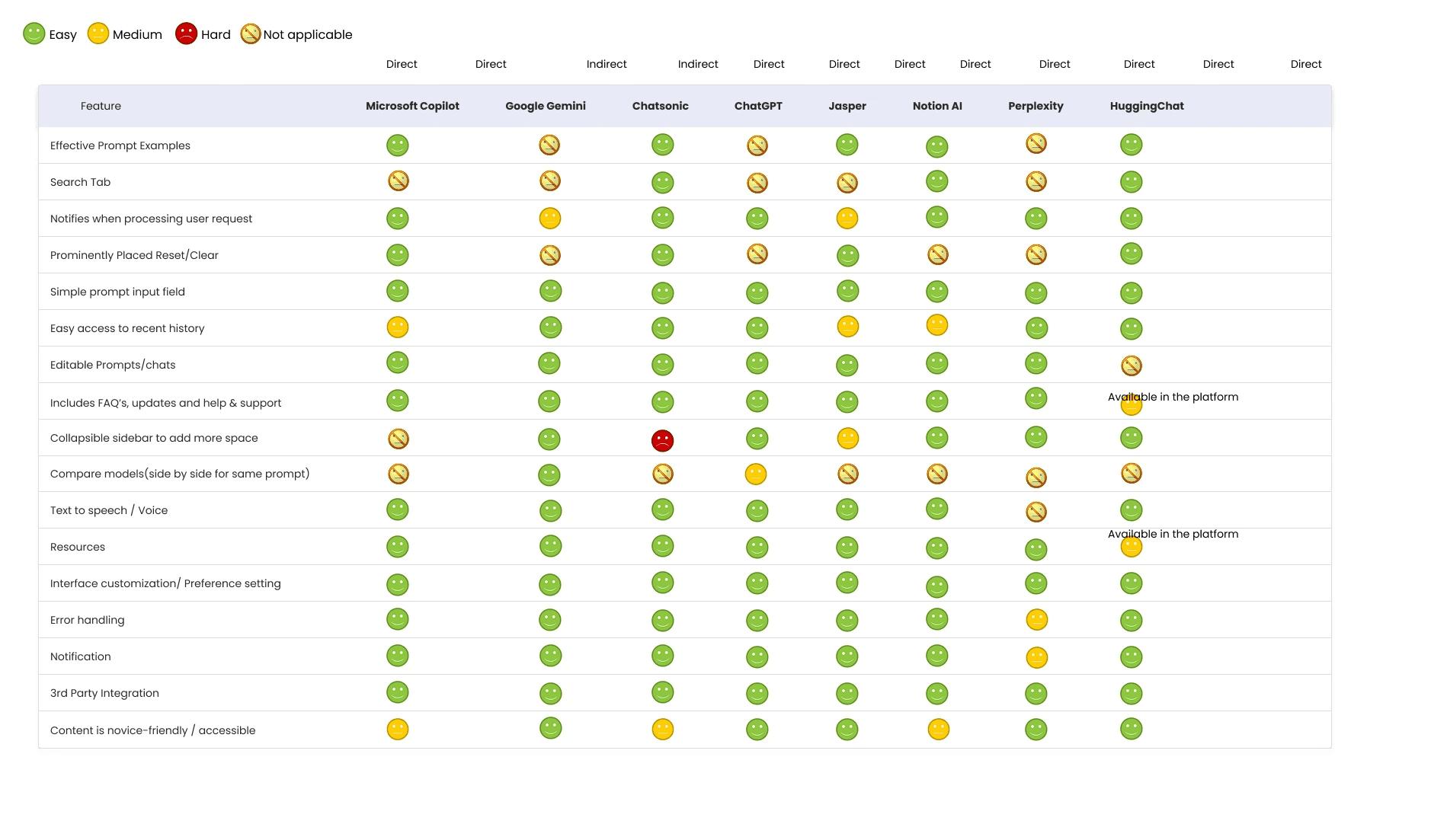
Competitor analysis, rating site features

Review of the user testing feedback

The form to report a problem with the app
Strategy
I wrote system messaging in the first person, leveraging a spirited and empathetic tone. This gave the AI a personality and made it more approachable.
Content strategy
1. Reduced ambiguity – make sure the content is transparent and descriptive.
2. Consistent tone and voice – use consistent language to build trust and familiarity.
3. Simplified technical terms – use plain language to make technical information accessible.
4. Contextual help and tooltips – break down complex features with simple explanations.
5. Actionable language – guide users through their tasks, beginning to end.
6. User-centric guidance – address the specific needs and pain points of the users.
Design strategy
1. Simple and clean – make UI elements easy to understand and use.
2. Visually consistent – provide a cohesive UI that users can learn and trust.
3. Intuitive – organize features with a logical mental model for easy navigation.
4. Accessible – help users that have disabilities access the tool effortlessly.
5. Responsive and supportive – reassure users of the actions they can take and their outcomes.
6. Adaptable – create an experience that can adapt to future changes and platforms.
New features
These aspects solved common problems and added customizability for the users’ convenience:
1. AI model comparison: users can view output from different models side by side.
2. Chat history: past chats are retained so users can resume or refer back to them.
3. Data libraries: prompts and documents can be easily accessed and managed more precisely.
4. Support resources: a robust collection of FAQs and patch notes, and a tool to provide feedback.
5. Guided experience: to help new users get their feet wet with an unfamiliar application.
More images

Output modifcation modal

Model comparison modal in the chat feature

Modal to upload a document

Modal to save a prompt to the library